Warehouse throughput is the number of units or orders a building ships in a set time, usually an hour or a shift. For ecommerce operations, it decides whether orders make the carrier cutoff. Most warehouses try to raise it by adding pickers. However, that approach stops working once walking, searching, and congestion eat the extra hours. The faster route is to remove the steps that slow each pick.
This guide explains how to measure warehouse throughput, where it stalls in an ecommerce operation, and which changes raise it without growing headcount.
In this article
- What is warehouse throughput?
- How to calculate warehouse throughput
- Where ecommerce order throughput stalls
- How to increase warehouse throughput without adding pickers
- What robotic fulfillment system improves ecommerce order throughput?
- Warehouse throughput results on a real floor
- A quick warehouse throughput checklist
- Warehouse throughput FAQ
- See higher throughput in person
What is warehouse throughput?
Throughput counts finished work. In an ecommerce building, that usually means orders shipped, order lines picked, or units picked per hour. Inventory sitting on a shelf does not count. Neither does an order that is half picked when the truck leaves.
Throughput is different from capacity. Capacity is what the building could handle on paper. Throughput is what it actually ships. The gap between the two shows where time is lost.
It also differs from productivity. Productivity measures output per person, such as units per labor hour. Warehouse throughput measures output for the whole operation. You can raise one without the other. For example, adding ten temporary pickers can lift throughput while productivity per person falls, because the aisles get crowded.
How to calculate warehouse throughput
The basic formula is simple:
Warehouse throughput = units (or orders) shipped ÷ hours worked
If a building ships 24,000 units in a 10-hour shift, its throughput is 2,400 units per hour. Track it by process step, too. Receiving, putaway, picking, packing, and shipping each have their own rate. The slowest step sets the pace for the whole building.
For ecommerce, three measures matter most:
- Orders per hour. This shows whether you will clear the day's orders before cutoff.
- Lines per hour. Ecommerce orders often carry one or two lines, so line rates track picking work closely.
- Units per labor hour. This shows whether gains come from better process or just more people.
Measure all three at your normal volume and at peak. A warehouse that ships well in March but misses cutoffs in December has a peak throughput problem, and more temps rarely fix it.
Where ecommerce order throughput stalls
Ecommerce orders are small, numerous, and unpredictable. Any SKU in the catalog can sell tonight. Because of that, the same bottlenecks show up in most manual buildings.
Travel between picks
In person-to-goods picking, the picker walks to the inventory. As the catalog grows, the walk grows with it. MHI points out that goods-to-person systems remove that walking between picks. Every minute spent walking is a minute not spent picking.
Searching and errors
Next comes search time. Pickers look for the right slot, check the SKU, and count units. Look-alike items stored side by side slow that step and cause mispicks. A mispick also costs throughput, because someone has to find the error, reship the order, and process the return.
Congestion at peak
The usual peak fix is more people. Still, more people in the same aisles means more waiting, more cart traffic, and more training time. Throughput per added picker drops as the building fills up.
Batching and wave timing
Batch and wave picking group work so pickers walk less. On the other hand, they add sorting steps and idle time between waves. Our comparison of order picking methods covers how each one trades travel against handoffs.
Replenishment and slotting
Finally, fast movers need prime locations near the front, and those locations need constant refilling. When demand shifts, someone has to re-slot the building. During that work, warehouse throughput suffers.
How to increase warehouse throughput without adding pickers
The goal is to raise output per hour while labor stays flat. Four levers do most of the work.
1. Bring inventory to the operator
Goods-to-person picking flips the model. Instead of the picker walking to the shelf, automation delivers each bin to a fixed workstation. The operator picks, confirms on screen, and the bin goes back into storage. As a result, the walk disappears, and so does most of the search. For a full explanation, read our guide to goods-to-person picking.
2. Let software group and sequence the work
In a manual building, planners build batches and waves by hand. In an automated one, software decides which bins go to which station, and in what order. Attabotics Software batches picks across multiple orders. It can also rush high-priority orders while it batches lower-priority ones. That way, late orders still make the truck.
3. Remove the slowest retrieval
A goods-to-person system is only as fast as its slowest bin. In stacked-bin designs, a bin buried deep in the stack has to be uncovered first. Direct access removes that penalty, so a slow-moving SKU arrives as quickly as a fast one.
4. Add capacity in small steps
Peak throughput depends on how the system scales. Ask whether you can add robots and stations without stopping the operation. If you can, you plan peak season by adding machines on a schedule you control.
What robotic fulfillment system improves ecommerce order throughput?
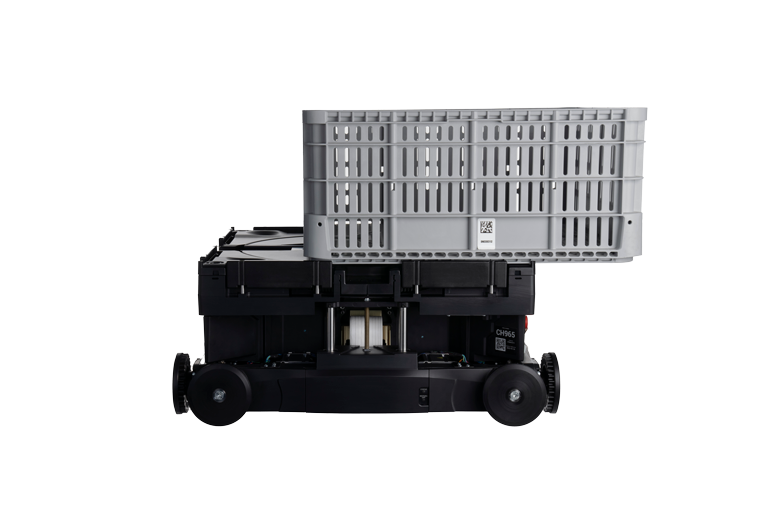
The Attabotics system is built around those four levers. Its Attabot robots travel horizontally and vertically inside the Cubic Storage Structure at 2.7 m/s. They reach every storage location directly, without digging through stacked bins. Consequently, any bin reaches an operator in under 90 seconds, wherever it sits in the structure.
Several design choices protect warehouse throughput specifically:
- Software runs the robots in 90-second waves. Sequencing, sortation, and conveyance happen inside the structure, so each station can pick, pack, and ship in one flow.
- Any order can be completed at any station. Work does not queue behind one busy zone.
- No single point of failure. If one robot goes down, the rest keep working. Meanwhile, robots charge on supercapacitors during work, so there is no battery swap break.
- Stations and robots add without a shutdown. You can raise capacity ahead of peak while the system keeps running.
At the station itself, the Node X workstation averages 300 bin presentations per hour, and up to 400 when optimized. Attabotics reports that robotic picking can lift rates from about 100 units per hour, a typical manual target, to 350 to 400 units per hour. In addition, the same stations handle decanting, cycle counts, and kitting.

Warehouse throughput results on a real floor
Customer results show how those rates translate to warehouse throughput:
- SCI, a third-party logistics provider running the system since 2019, picks 65% more units per hour in 70% less space.
- Gordon Food Service in Calgary has run the system since 2018 alongside its existing manual picking and reports twice the presentation efficiency.
- Modern Beauty Supplies reports an 84% reduction in picking labor, with more than 95% of picking automated.
Across the platform, Attabotics reports up to 75% less labor and up to 85% less space than traditional racking. Those two numbers matter together. A building that ships more per hour in less space can absorb growth without a new lease.
If you are still comparing system types, our guide to automated storage for ecommerce orders lays out how cube storage, shuttles, climbing robots, and floor robots differ.
A quick warehouse throughput checklist
Before you talk to any vendor, gather these numbers:
- Orders, lines, and units shipped per hour at normal volume and at peak.
- The rate for each step: receiving, putaway, picking, packing, shipping.
- Units per labor hour, so you can see whether gains come from process or headcount.
- Your SKU count and how fast it is growing.
- How many orders miss cutoff each week, and why.
These figures show where your throughput stalls. They also give you a baseline to hold any system against after go-live.
Warehouse throughput FAQ
No single number fits every building. The right target depends on order profile, SKU count, and cutoff times. Compare your own rate at normal volume and at peak, and by process step. The slowest step tells you where to invest first, and the gap at peak shows how much capacity you need.
Divide the units or orders shipped by the hours worked. For example, 24,000 units over a 10-hour shift equals 2,400 units per hour. Then measure each step separately, because the slowest step limits the whole building.
Start with picking, since it usually holds the most labor. Goods-to-person systems bring bins to a fixed station, so walking and searching drop out. Software then sequences the work across orders. With direct access to every bin, slow movers arrive as quickly as fast ones.
It depends on labor rates, volume, and space. Automation costs more up front. However, Attabotics reports up to 75% less labor and up to 85% less space than traditional racking. Weigh that against the yearly cost of the pickers, temps, and floor space you would otherwise add.
See higher throughput in person
Throughput numbers make more sense when you watch bins arrive at a station in sequence. Book a site tour to see the system running, or explore the technology behind it.